Recovering a bad shot…

We all have them…shots where the subject looks good, but your techincal skillz are lacking…too dark, too much noise, not sharp enough. What to do?

Here is a shot of Beau, my trust compadre beagle, in which he looks FAB…but there is way too much noise and not crisp enough focus.
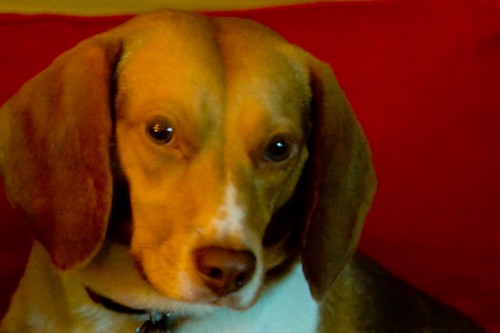
So using Scott Kelby’s though process, I set about recovering my darling boy’s expression. I used curves to color correct, then punched it up in LAB channels. I sharpened using Unsharp Mask. I smoothed out the noise and applied the portrait filter. All looked fine…yet I could tell it was a bad photo… so dry brush Artistic filter to the rescue…and viola!

Artist rendering of Beau in Red…yeah…that’s right I had this in mind all along.

Wanna buy a bridge?

Karmardav…made a great point about the background being too vibrant

So how is this?

7 responses to “Recovering a bad shot…”

  1. Very nice! And yes, if you are selling a bridge that I can keep in my backyard, I’d love to buy one. You know how I love bridges. It’ll give me something to photograph on those days that I have no new ideas for my Project 365.

  2. Nice job. I’ve gotta get me some Photoshop and start learning 🙂

  3. Ooh, Brc, I just saw that Photoshop Elements 6.0 will be on sale at Costco in a few weeks. Something like $30 off, which will make it about $49.99.

  4. I agree that there is a big improvement in Beau’s appearance, but I don’t think I care for the punched up red in the background – its distracting from Beau. The more subdued red of the original with the brushed Beau I think would be a nice combination. Any chance of seeing that?

  5. I like the new one. The softer red goes nicely with Beau’s expression.

  6. Got a question on a completely different topic – is the next shutter challenge due the 20th or the 30th? Your post about it mentions both dates. Still trying to decide on a subject here.

  7. The new one is definitely better than the other one. But if I’m being honest (channeling Simon in honor of AI premiere next week), I am still not thrilled with it. The whole left side of Beau’s face just looks very out of focus and too flat. There’s no detail left. It really is an adorable expression on his face though, and I like the composition.

Leave a comment